What a $2,000/Month Google Ads Budget Should Look Like for Contractors
Most contractors either spread $2,000 too thin across too many campaigns or dump it all into one broad setup and wonder why the leads don't come. Here's the exact allocation that works.
Two thousand dollars a month is one of the most common starting budgets for contractors running Google Ads. It's enough to generate real results in most markets — but only if it's allocated correctly. Spread it wrong, and you'll burn through it in three weeks with a handful of unqualified clicks to show for it.
After managing Google Ads for dozens of home service businesses, the same budget mistakes show up repeatedly: too many campaigns, wrong campaign types for the budget size, no allocation for remarketing, and no account for the learning period Google's AI needs to perform.
Here's what $2,000/month should actually look like for a contractor in a mid-size US market.
The Rule Before Allocation: Focus Before Scale
The most expensive mistake with a $2,000 budget is trying to do too much. $2,000 spread across roofing, gutters, siding, and windows in a competitive city means none of those campaigns have enough data to optimize. Google's Smart Bidding needs a minimum of 30 conversions per month to function well. If you're splitting $2,000 four ways, you're getting maybe 5–8 conversions per campaign — not enough for the AI to learn anything useful.
The rule: at $2,000/month, pick your one highest-value service and own it before expanding. The contractor who dominates "roof replacement Dallas" with $2,000 will out-earn the contractor running four mediocre campaigns at $500 each every time.
The Recommended $2,000 Allocation
Here's the split that consistently outperforms other configurations at this budget level:
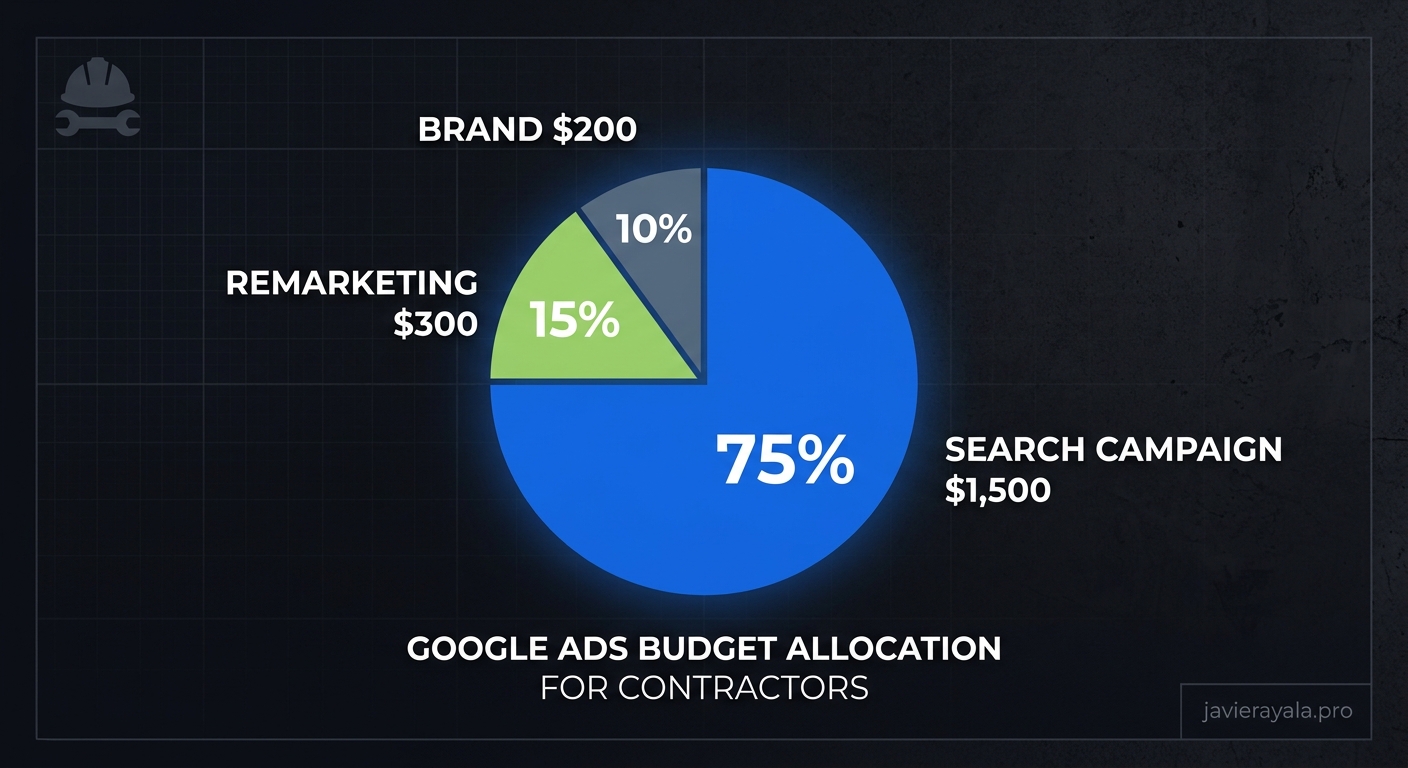
- $1,500 — Primary Service Search Campaign (75%)
Your highest-ticket or highest-volume service. Exact and phrase match keywords only. Maximize Conversions bidding strategy for the first 60 days, then transition to Target CPA once you have 30+ conversions. This is where you generate leads. - $300 — Remarketing Campaign (15%)
Targets people who visited your website but didn't call or fill out a form. This budget goes an extremely long way because your audience is small and pre-qualified — they already know who you are. Expect 3–5x the conversion rate of cold traffic at a fraction of the cost-per-click. Don't skip this. - $200 — Brand Campaign (10%)
Bidding on your own business name. If you're not running brand campaigns, competitors are. A click on your brand name costs $0.20–$0.80 vs $8–$25 for generic service terms. This protects your reputation and captures high-intent searchers at near-zero cost.
What This Budget Realistically Generates
Assuming a mid-competitive market (not NYC, LA, or Chicago), an average CPC of $8–$15, and a landing page converting at 8–12%:
- $1,500 primary campaign: 100–187 clicks → 8–22 leads
- $300 remarketing: 60–100 clicks → 12–20 leads (higher conversion rate)
- $200 brand: 100–250 clicks → 15–25 leads
Total: roughly 35–67 leads per month at $2,000.
In a hyper-competitive market — roofing in Dallas or HVAC in Phoenix — these numbers are lower. In a smaller market with less competition, they're higher. The key variable isn't the budget; it's the quality of conversion tracking, the quality of the landing page, and whether the campaign structure is feeding Google's algorithm the right signals.
Why AI Changes the Math at $2,000
The numbers above assume a competently managed manual campaign. With AI-driven optimization — Smart Bidding properly configured, Responsive Search Ads running with enough asset combinations, conversion tracking clean and complete — the same $2,000 consistently delivers 20–35% better cost-per-lead outcomes.
The reason: Google's auction system rewards relevance and conversion probability in real time. An AI-optimized account with strong Quality Scores pays less per click for the same position than a poorly structured account. In practical terms, that means your $1,500 primary campaign gets 20–30 more clicks per month than the equivalent manually managed campaign — at no additional cost.
This is why account structure matters before budget size. A $2,000 account with clean structure and accurate conversion data will outperform a $3,500 account with structural issues. Google charges less and shows you more when the AI trusts your account.
What Kills a $2,000 Budget
Five account problems that will waste your entire budget regardless of how well it's allocated:
- Broad match keywords without negatives. "Roofing" on broad match will match searches like "roofing nails for sale" and "roofing school near me." Add a negative keyword list of at least 50–100 terms before launching.
- No call tracking. If phone calls aren't tracked as conversions, Google's algorithm has no idea what's working. It will optimize toward form fills and abandon call-heavy placements — even if calls are your primary lead type.
- Sending traffic to your homepage. Homepage conversion rates for Google Ads traffic average 2–4%. A dedicated landing page focused on one service, one CTA, and fast load time averages 8–15%. Same budget, 3x the leads.
- Auto-applied Google recommendations. Google will suggest expanding match types, adding broad match keywords, and increasing budgets. Most of these recommendations benefit Google's revenue, not your cost-per-lead. Review them manually before applying anything.
- Switching strategies too fast. Smart Bidding needs 4–6 weeks to learn. If you change budget or bidding strategy every two weeks because you "don't see results yet," you're resetting the learning period continuously and the algorithm never stabilizes.
When to Increase the Budget
Add budget when and only when:
- Your Target CPA is stable and consistently hitting the goal for 30+ days
- Your campaign has 50+ conversions in the last 30 days
- Your impression share loss due to budget (not quality) is above 20%
Increasing budget before those conditions are met means you're scaling a campaign that hasn't finished learning. You'll spend more and get the same — or worse — results per dollar.
When those conditions are met, scale in 20–30% increments and give the algorithm two weeks to adjust to each increase. Doubling budget overnight disrupts the bidding model and typically causes a temporary CPA spike.
The Bottom Line
$2,000/month is a solid starting point for Google Ads if it's deployed with discipline: one primary service, a remarketing layer, brand protection, and a landing page that's actually built to convert. Get those four things right, and you're looking at 35–60 qualified leads per month in most US markets.
Get them wrong, and you'll burn through $2,000 in three weeks wondering why Google Ads "doesn't work."
If you want to know exactly what your current $2,000 is doing — where it's going, what's being wasted, and what a properly allocated setup would generate — get a free Google Ads AI Scan. We'll pull your actual account data and show you the gap between what you're spending and what you should be getting. Or explore how our Google Ads AI management keeps every dollar working at maximum efficiency.
Want a Free 1-on-1 Strategy Call?
Enter your email and we'll send you a link to book a free 30-minute call — we'll audit your current marketing and map out exactly what to build.